.png)

Free file recovery application
Disk Drill is a free data recovery software program that lets you restore deleted files. There are additional tools that prevent accidental deletions from happening in the future. Disk Drill is a cross-platform service developed by CleverFiles. Mac users will need to upgrade to Disk Drill pro to recover certain file types.
Top Recommended Alternative

EaseUS Data Recovery Wizard and Recoverit are additional data recovery tools to recover deleted files. The apps are available for Mac and Windows PC operating systems. While you can use the EaseUS Data Recovery Wizard for free to recover data, Recoverit gives you a free trial to use before you need to buy the service.
Is Disk Drill really free?
The free Disk Drill for Mac package is different from the free download for Windows since the macOS freeware is more limited. The Windows plan gives you 500 MB of data recovery, while the Mac download does not. Certain file systems can only be previewed with the free Mac software version.
The developers tell Mac users to have data protection commands turned on to get a portion of the free file recovery methods. Whether you are on a Mac or Windows OS, Disk Drill will require you to upgrade to the premium version to get unlimited data recovery.
While Disk Drill is most popular for data restoration, the service gives you prevention utilities for free. The cleanup feature scans your hard drive to let you know how much disk space the files are using. The service will give you a list with visuals to show you the folders that are using the most storage space on your Mac. You can delete the files directly in the user interface to free up space.
Another free utility tool that lets you create space is the ‘Duplicate Finder’. You can choose the locations that you want Disk Driver to scan. A list will appear to let you know the files that have duplicates.
You can individually delete copies. A quick removal feature lets you filter your duplicates by ‘Auto’, ‘Newest’, and ‘Oldest’ to quickly remove unwanted items. The free backup tool lets you create backups for disks and partitions.
Is Disk Drill any good?
Disk Drill is good for file management, protection, and recovery. You can use data restoration features during emergency situations. Disk Drill delivers preventative utilities like the disk health program. The S.M.A.R.T. disk system monitors your internal and external hard drives for issues that may arise. S.M.A.R.T. stands for self-monitoring analysis reporting technology.
Disk Drill will notify you when a problem is detected and you can choose how you want to resolve the announced issues. The protection services are available directly in the user interface beneath ‘Extra tools’. Additionally, the boot drive utility lets you create a bootable USB flash drive or SD card, and a data shredder lets you securely erase files that you do not want.
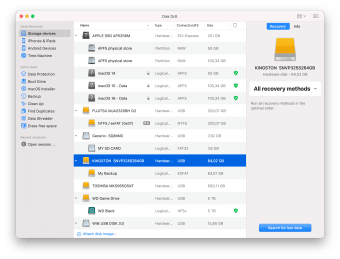
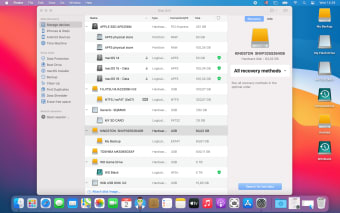
Disk Drill is compatible with Android and Apple iOS devices like iPad and iPhone. ‘Storage devices’ and ‘Time Machine’ are additional tabs available in the ‘Data Recovery’ section. The accessories that are connected will be displayed in the center of the UI. You can see the name, type, and size of the equipment that is connected.
Recovery Methods
Disk Drill will analyze your drive data for files to recover. If you have the Disk Drill Pro version for Mac, then you can select the ‘All recovery methods’ to perform the entire suite of scanning procedures. The drive recovery modes include ‘Deep Scan’, ‘Scan for lost HFS+ partition’, and ‘Universal partition search’.
The ‘Type’ section will let you know whether the storage device is a hardware disk, iOS backup, etc. Disk Drill supports memory cards, USB drives, external and internal hard drives, etc. You can highlight an accessory to search for lost data. The device information will appear on the right. A dropdown menu will be available to let you choose a recovery process for storage devices.
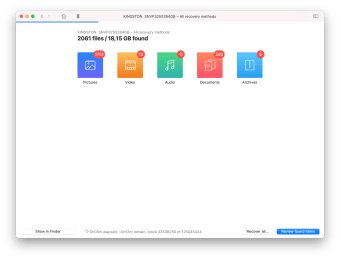
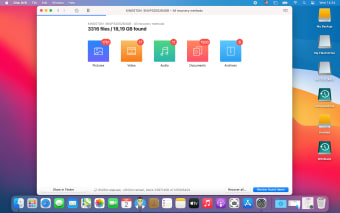
The scan results will be organized by categories on the left. You can click on ‘Review found items’ after the scan to browse the list of archives that Disk Drill finds. Pictures, video, audio, documents, archives, and other file types are available sections to review. An ‘All files’ area will combine the results together. The number of retrieved files will be next to the category labels.
A preview image will appear on the right when you highlight an item. Only files that have a preview can be recovered. You can recover files by clicking ‘Recover’ after you mark the items you want to restore. A window will appear to let you choose a destination on your Mac to save the restored items.
Is Disk Drill trustworthy?
Disk Drill is safe to use for both business and personal use since it has a security feature called data protection that monitors incoming files to make new backups. Data protection lets you protect your data with the Guaranteed Recovery and Recovery Vault.
The Guaranteed Recovery keeps copies of deleted files, while the Recovery Vault only stores metadata for items. As you can imagine, the Guaranteed Recovery requires more disk space than the Recovery Vault does. You can turn the feature on or off in the ‘Data Protection’ tab.
A suite of disk management tools
Disk Drill is a streamlined application that you can easily explore. All the recovery and protection commands are available on the left side of the UI. The developers have added a dark design to let you customize your user experience further.
While you can download Disk Drill for free or buy the lifetime package, the lifetime upgrades are available as an add-on for an additional price.
What’s new?
New software updates are released consistently, and you can view version release notes on the official website. The software updates include completely new features, improvements to performance, and fixes to problems.